How to enable and use Custom instructions in ChatGPT
“Custom instructions” is a ChatGPT feature that launched on July 20, 2023.
Here’s a guide on what you need to know about it.
What is ‘Custom instructions’?
‘Custom instructions’ is a feature that allows you to provide ChatGPT with additional context about you and the way you want it to respond. ChatGPT will use this context across all your chats to provide answers that are suit your preferences.
This feature is available for all users. You don’t need ChatGPT Plus to use this feature.
You can modify your instructions at any time. ChatGPT will save the instructions that you used for every chat. This means that when you open a chat from your chat history, you can see if you used custom instructions on it, and what those instructions were.
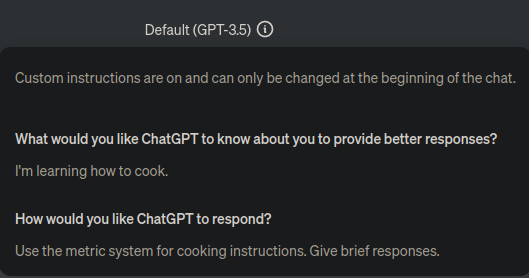
How to use Custom instructions in ChatGPT
Setup ChatGPT Custom Instructions in your browser
- Open https://chat.openai.com. Log in if you haven’t already.
- In the bottom-left corner, click on your name.
- Click on the ‘Custom instructions’ button. You should see something like this:
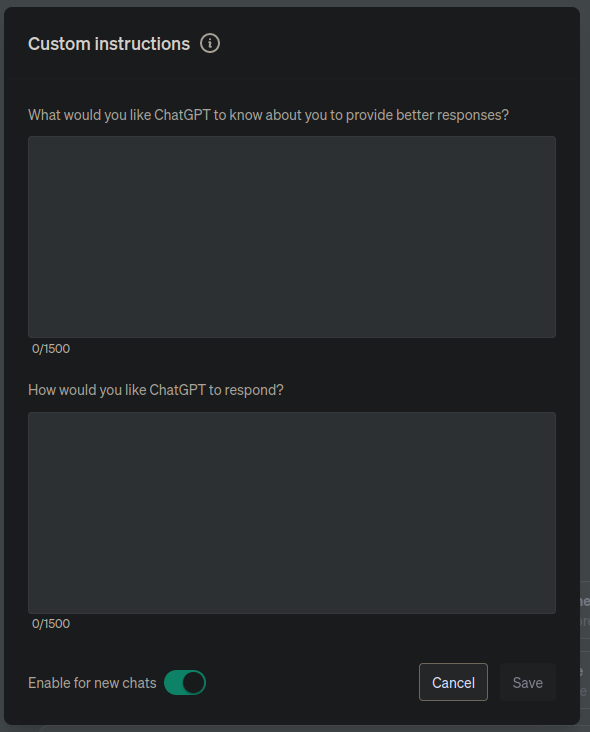
- Check the ‘Enable for new chats’ checkbox.
- Fill in the inputs the way you want
- Click ‘Save’
Setup ChatGPT Custom instructions on your phone
- Open the ChatGPT app
- Click the three dots (
...) button on the top-right corner - Click ‘Settings’
- Click ‘Custom Instructions’
- Click the checkbox in the top-right corner to enable Custom instructions
- Fill in the inputs the way you want
- Click ‘Save’
For more information about ChatGPT’s Custom instructions, check out the official announcement or the FAQ.